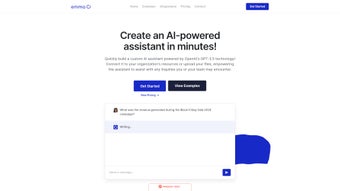

Download Emma AI – Custom AI Assistant Builder, Secure Chatbot Tool
Introduction
Emma AI is a cloud‑based, no‑code chatbot platform that brings the power of OpenAI’s GPT‑3.5 language model to teams that need a fast, secure, and scalable way to turn static knowledge bases into interactive assistants. Whether you run a help‑desk, a sales enablement hub, or an internal HR FAQ, Emma AI lets you create a conversational agent without writing a single line of code. The platform’s drag‑and‑drop builder guides users through defining intents, linking data sources such as Google Sheets, Excel, SharePoint, or SQL databases, and testing responses in real time.
Once the bot is trained, it can be deployed across a web widget, a native Windows or macOS desktop client, or accessed through a RESTful API for deeper integration. What sets Emma AI apart is its adaptive training engine, which records every user correction and feeds it back into the model, allowing the assistant to become more accurate with each interaction. Security is baked in: all traffic is encrypted with TLS 1.3, data at rest uses AES‑256 encryption, and the service complies with GDPR, ISO‑27001, and other enterprise standards.
The platform also offers role‑based permissions, version control, and a comprehensive analytics dashboard that shows usage trends, satisfaction scores, and response latency. In practice, Emma AI reduces the time spent searching for information, cuts the number of repetitive tickets, and frees up human agents to focus on higher‑value work. By providing a single, always‑on knowledge source that can be customized for any department, the tool helps organizations improve productivity, lower support costs, and deliver a more consistent user experience across web, desktop, and mobile channels.
Key Features & Integrations
- GPT‑3.5 Powered Conversations – Delivers natural, context‑aware dialogue that feels human‑like.
- No‑Code Bot Builder – Visual drag‑and‑drop interface for creating intents, entities, and response flows without programming.
- Multi‑Channel Deployment – Publish bots as embeddable web widgets, native Windows/macOS desktop apps, or via RESTful API.
- Data Source Connectivity – Direct integration with Google Sheets, Microsoft Excel, SharePoint, CSV files, and SQL databases.
- Team Collaboration Integrations – Built‑in connectors for Slack, Microsoft Teams, and Zapier automations.
- Adaptive Training Engine – Learns from corrected answers and improves response accuracy over time.
- Role‑Based Permissions & Governance – Fine‑grained access control, audit logs, and compliance reporting.
- Versioning & Rollback – Save bot snapshots and revert to previous versions with a single click.
- Analytics Dashboard – Real‑time metrics on query volume, user satisfaction, response time, and error rates.
- Secure Cloud Hosting – End‑to‑end encryption, GDPR‑ready, ISO‑27001 certified infrastructure.
Each of these features is designed to reduce friction for both technical and non‑technical users. The no‑code builder eliminates the steep learning curve traditionally associated with chatbot development, while the adaptive training engine ensures the assistant evolves alongside your organization’s knowledge base. The integration layer is particularly noteworthy; by supporting both native apps like Slack and automation platforms like Zapier, Emma AI can trigger downstream actions such as ticket creation, calendar events, or CRM updates without leaving the conversation. The analytics dashboard provides actionable insights, allowing managers to pinpoint knowledge gaps, measure ROI, and continuously refine the bot’s performance. Together, these capabilities transform a simple Q&A bot into a true productivity hub that can be embedded in daily workflows across any department.
Installation, Compatibility & How to Use Emma AI
Getting Started – Web Access
The quickest way to experience Emma AI is through its web portal. Visit emma.ai, register for a free trial, and you’ll be greeted by a guided onboarding wizard. The wizard walks you through creating your first assistant: you name the bot, select a data source (e.g., a Google Sheet), and define a few example questions. Within minutes you have a live chatbot ready to embed on any webpage using a single line of JavaScript. The wizard also offers a sandbox environment where you can test interactions without affecting production data.
Desktop Application Installation
For users who prefer a native experience, Emma AI offers downloadable clients for Windows 10/11 and macOS 10.15+. The installer is a standard .exe (Windows) or .dmg (macOS) package, signed by a trusted certificate authority to ensure a secure download. After installation, the app automatically authenticates with your cloud account and presents the same no‑code builder found in the web version. The desktop client also supports offline caching, allowing you to view previously loaded knowledge bases even without an active internet connection. System requirements are modest: a 2 GHz processor, 4 GB RAM, and at least 200 MB of free disk space.
API & Custom Integration
Developers can extend Emma AI’s capabilities via its RESTful API. The API is documented on the developer portal and includes endpoints for creating bots, uploading training data, and retrieving conversation logs. Authentication uses API keys scoped to specific projects, keeping access tight and auditable. Sample code snippets are provided for popular languages such as Python, JavaScript, and Java, making integration into existing services straightforward. Webhooks let you push events—like a new ticket creation—directly to third‑party services, while the Zapier connector offers over 2,000 ready‑made actions for rapid automation.
Compatibility
Emma AI runs on any modern browser (Chrome, Edge, Firefox, Safari) and supports the following operating systems:
- Windows 10, 11 (64‑bit)
- macOS 10.15 Catalina and later
- Linux distributions with a recent glibc (via the web client)
- iOS 13+ and Android 9+ (mobile‑optimized web view)
Because the core engine lives in the cloud, the local hardware requirements are minimal—only a stable internet connection and a modern browser are needed to manage bots. The desktop clients add a small footprint (≈150 MB) and use minimal CPU while idle.
Typical Workflow for Building a Bot
1. Define the Use‑Case: Identify the task—e.g., “FAQ for HR policies.”
2. Connect Data Sources: Link the relevant Google Sheet, SharePoint folder, or SQL table.
3.
Train the Bot: Provide sample Q&A pairs; let the adaptive engine refine responses based on real‑time feedback.
4. Deploy: Embed the chat widget on your intranet, launch the desktop client, or expose the bot via API.
5. Monitor & Improve: Use the analytics dashboard to track performance, identify gaps, and feed new data back into the training loop.
This repeatable cycle ensures that the assistant remains aligned with evolving business needs, while the low‑code environment keeps maintenance costs low. Teams can iterate quickly, launch new assistants for emerging projects, and retire outdated bots with a single click, all without involving a dedicated development team.
Pros, Cons, Frequently Asked Questions & Conclusion
Pros
- Intuitive no‑code builder reduces time‑to‑value.
- Deep integration with common business tools (Slack, Zapier, Google Workspace).
- Adaptive training makes the bot smarter over time.
- Secure, GDPR‑compliant hosting with end‑to‑end encryption.
- Cross‑platform availability (web, desktop, API, mobile).
- Robust analytics and version control for enterprise governance.
- Role‑based permissions and audit logs for compliance.
- Scalable cloud architecture handles high query volumes.
Cons
- Advanced custom logic still requires API usage, which may need developer resources.
- Pricing tiers can become costly for large teams with high query volumes.
- Reliance on cloud connectivity—offline capabilities are limited to cached data.
- Current language model is GPT‑3.5; organizations seeking GPT‑4 level nuance must wait for future updates.
- Exporting large conversation histories may require additional processing time.
Frequently Asked Questions
Can Emma AI integrate with my existing CRM?
Yes. Emma AI provides webhook support and a Zapier connector, allowing you to push or pull data from most major CRMs such as Salesforce, HubSpot, and Microsoft Dynamics.
Is there a free trial or free tier?
Emma AI offers a 14‑day free trial with full feature access. After the trial, a limited free tier remains available, supporting up to 500 queries per month.
How does the training function work?
When a user corrects a bot’s response, the correction is logged and fed back into the underlying language model. Over time, the assistant improves its accuracy for similar queries.
What security certifications does Emma AI have?
Emma AI is ISO‑27001 certified, GDPR‑ready, and employs TLS 1.3 encryption for all data in transit. Data at rest is encrypted using AES‑256.
Can I export the conversation history?
Yes. The platform includes an export feature that lets you download logs in CSV or JSON format for compliance or analysis purposes.
Conclusion & Call to Action
Emma AI stands out as a practical, secure, and highly adaptable solution for businesses that want to turn static documentation into living, conversational assistants. Its blend of a no‑code builder, powerful GPT‑3.5 engine, and extensive integration library means you can launch a functional bot in hours rather than weeks. While larger enterprises may need to budget for higher query volumes and consider occasional developer involvement for deep customisation, the overall value proposition is compelling for teams of any size.
If you’re ready to streamline help‑desk operations, reduce repetitive data‑lookup tasks, and give your employees a reliable AI‑powered knowledge partner, download Emma AI today. Start with the free trial, experiment with a simple spreadsheet‑backed assistant, and watch how quickly the platform learns and scales to meet your organization’s unique needs.
Emma AI delivers a frictionless experience for building custom AI assistants, combining ease of use with enterprise‑grade security. Its adaptive training and robust integration options make it a solid choice for businesses looking to boost productivity.



.png)



